
Photos, Places, and the Permissions We Chose Not to Ask For
Attaching a photo and a place to an entry should take one tap. Getting there meant declining two permission prompts we could easily have shown you.
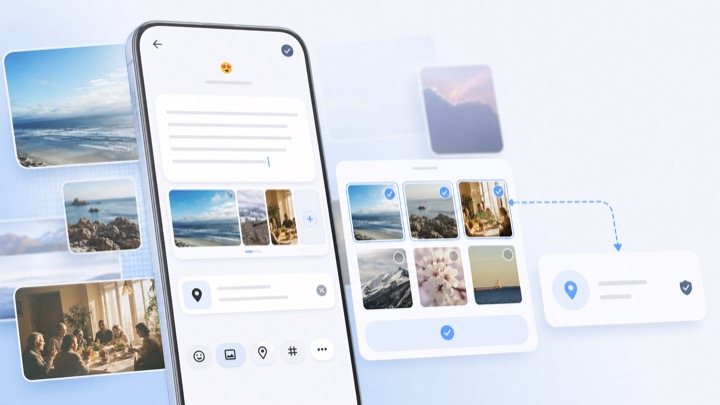
An entry with a photo and a place attached is dramatically easier to remember than the same text alone. It is also, historically, the part of a journaling app that asks for the most access. We spent a couple of releases trying to get the first thing without the second.
Photos: the picker that does not need a permission
ONEDiary uses the Android photo picker rather than requesting broad access to your media library. The picker runs outside the app, you choose the specific images you want, and the app receives only those. There is no gallery-wide read permission in the flow, which means there is no permission dialog to accept and nothing to revoke later.
The trade is that we cannot browse your library to suggest "photos from today" without you opening the picker first. That is a real feature we gave up. We took it because a diary app holding a standing grant to every photo on the device is a bad shape, regardless of what the app does with it.
Places: reading the photo instead of the phone
Version 1.4.9 added something small that changed how the editor feels: if a photo you attach carries GPS data in its EXIF metadata, the entry offers that location automatically.
The interesting part is what this replaces. The obvious way to auto-fill a location is to request a location permission and read the device's current position. But the photo already knows where it was taken, you already chose to attach it, and the coordinate you actually want is where the moment happened — not where you are sitting when you write it down. Reading the file is more accurate *and* asks for less.
You can still search for a place by hand, and you can remove or change any suggested location before saving.
Migrating to Places API (New)
The place search behind that field moved to the Places SDK 5.2.0 line and the newer Places API in 1.4.9. Alongside the SDK change we reworked the surface around it, because the old flow had accumulated problems:
- Search now happens inside the location sheet instead of pushing a separate screen, which removed a class of crashes in the authentication flow during screen transitions.
- Recent places are sorted by distance from your current position, so the nearby one is first rather than the most recent one.
- Recent places show a venue name — the building or business — instead of a street address, because that is what you would actually call the place.
- The sheet lifts above the keyboard when it is open, which sounds obvious and was not previously true.
In 1.4.8 we also stopped the map from fighting the dismiss gesture. Panning a map inside a draggable sheet means every drag is ambiguous, so the location panel now closes with an explicit button instead of guessing which gesture you meant.
The general rule
When a feature needs data, there are usually three ways to get it: ask the system for a permission, ask the user to hand you the specific thing, or derive it from something you already legitimately have. Those are in decreasing order of convenience for us and increasing order of respect for the person using the app.
We do not always land on the third option. But it is the one we look for first, and both of these features ended up there.
Try it on your own phone.
Free on Google Play. Android 10 or later. No account needed to start writing.